
Breaking up with Alexa
Lately, privacy has become a more present concern for me and my family. It’s really a pick-your-poison situation, blame it on the constant data leaks, or sketchy data collection practices, or the growing threat of authoritarianism. Suffice it to say that at this point, I don’t really trust Google or Amazon to handle recordings of my day-to-day life.
The main feature we use from Alexa is the voice command to turn lights on and off. Over the years, we’ve bought a couple of different smart LED bulbs and light switches from different brands, and Alexa made controlling them really simple. From my cursory research, the Home Assistant open source home automation software seems to be the best alternative.
Self-Hosted Home Assistant on Kubernetes
We already have a Kubernetes cluster at home via k3s, so my plan was to deploy Home Assistant there. The deployment is pretty straight forward:
apiVersion: apps/v1
kind: Deployment
metadata:
  name: homeassistant
spec:
  replicas: 1
  selector:
    matchLabels:
      app: homeassistant
  template:
    metadata:
      labels:
        app: homeassistant
    spec:
      containers:
      - image: homeassistant/home-assistant:stable
        name: homeassistant
        ports:
        - containerPort: 8123
        volumeMounts:
        - mountPath: /config
          name: config
      hostNetwork: true
      volumes:
      - hostPath:
          path: /var/homeassistant
        name: config
---
apiVersion: v1
kind: Service
metadata:
  labels:
    run: homeassistant
  name: homeassistant
spec:
  ports:
  - port: 8123
    protocol: TCP
    targetPort: 8123
  selector:
    app: homeassistant
---
apiVersion: networking.k8s.io/v1
kind: Ingress
metadata:
  name: homeassistant-ingress
  namespace: homeassistant
spec:
  rules:
  - host: homeassistant.mylocalnetwork.com
    http:
      paths:
      - pathType: Prefix
        path: "/"
        backend:
          service:
            name: homeassistant
            port:
              number: 8123
Remote Connections
I’ve been using Tailscale to connect to the k3s cluster when I’m away from home. It replaced the OpenVPN server that was running on my old FreshTomato router and I haven’t looked back.
To simplify configuration for clients, I used public DNS records to create a wildcard record (like *.mylocalnetwork.com)
pointing to the Tailscale IP address of the k3s cluster. With this setup, I could create arbitrary subdomains for each
service, all routed securely through Tailscale.
flowchart LR
  subgraph HomeServer
    subgraph k8s[Kubernetes]
      PhotoPrism
      HomeAssistant
    end
    hs_ts[Tailscale]
    hs_ts <--> k8s
  end

  subgraph Mobile
    direction TB
    mb_ts[Tailscale]
    mb_ts <-. Wireguard .-> hs_ts
    Browser <--> mb_ts
  end
One pain point was that I always needed to run the Tailscale client, even when I was connected to my home network. Between battery concerns reported by this GitHub issue and the thought of having to justify this network setup to my friends and family, I decided to fix it.
Subnet Router
Subnet routers let you extend your Tailscale network (known as a tailnet) to include devices that don’t or can’t run the Tailscale client. They act as gateways between your tailnet and physical subnets, enabling secure access to legacy devices, entire networks, or services without installing Tailscale everywhere.
— https://tailscale.com/kb/1019/subnets
A subnet router is a machine that allows devices on the tailnet to reach devices on the machine’s local network and vice versa, without needing to install Tailscale client on those devices.
In my case, I wanted to allow any machine on my local network 192.168.1.0/24
to be able to connect to a local machine but via its tailnet IP.
No changes to the tailnet are necessary for this configuration.
First, the target machine (the k3s host) must be updated to allow IP forwarding.
# Enable IP forwarding
echo 'net.ipv4.ip_forward = 1' | sudo tee -a /etc/sysctl.d/99-tailscale.conf
echo 'net.ipv6.conf.all.forwarding = 1' | sudo tee -a /etc/sysctl.d/99-tailscale.conf
sudo sysctl -p /etc/sysctl.d/99-tailscale.conf
Second, the local network router must be configured to route the tailnet IP to the target machine using the local network IP.
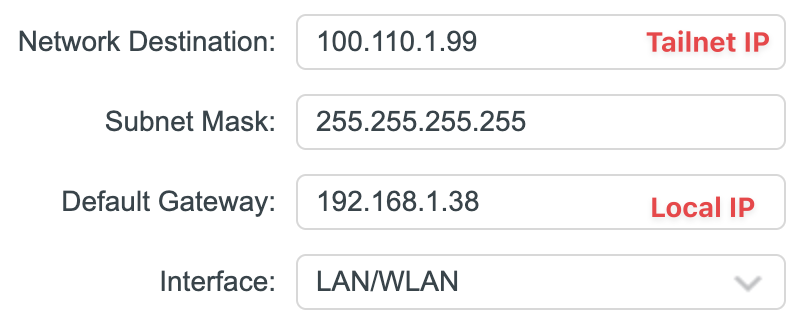
With this setup, I can use the same hostname whether I am home or not, and only need to run the Tailscale client when I’m away from home.
What about the voice?
I still need to replace the Amazon Echo dots that were sitting around the house. The Home Assistant Voice seems interesting, but upcycling an analog phone checks a lot of boxes for me and looks great: